# Configuration structure
## 1. Initial settings
Open the file `shared.lua`, available inside the **SHARED** folder
Framework = "" -- Add your specific Framework
DebugMode = "false" -- Active and Deactive Print are necessary
CommandSettings = "" -- Command to configure the positions of the [NOTIFICATIONS/SCOREBOARD AND KILLFEED] present in the script. Only those who have the permission on line "17" will be able to use the command.
CommandOpen = "" -- Comando para abrir a arena por permissão se na linha "13" não estiver "false" e sim sua "Pemr" Adicionada / Command to open the arena by permission if line "13" is not "false" but rather its "Pemr" Added
ExitViewMode = "" -- Command to exit the assist mode & adm mode if you do not want to accompany the confrontations
CommandPermission = "" -- "Perm" or false - Add a Permission to use arena as Monetized "VIP". The "false" setting is for access only with Blip and not by command
useBlipPermission = "" -- Set True [PARA ACCESSAR APENAS PELO BLIP SE NA LINHA "14" FOR "FALSE"] - Set False [ PARA RELEAR ACESOS BOTH BY COMMAND AND BLIP]
ButtomTab = "" -- "SCOREBORD" key that opens or blocks within games
AdminPermission = "" -- Nome gives permission to be inserted into your trust positions to release the ADM mode
DisableArmour = "" -- ["False" to ENABLE USE OF COLLETS] - ["TRUE" to DISABLE USE OF COLLETS]
RoomMaxTime = 5, -- MAXIMUM TIME IN MINUTES THAT A ROOM CAN REMAIN WITHOUT INTERACTION (IT WILL BE DELETED AFTER THAT)
SetArmour = 100 -- maximum of your server's Colete
MaxHealth = 200 -- Maximum life of your server's order
MinHealth = 101 -- Minimum order life for your server
WeaponAnim = "" --- ["True" para ATIVAR A ANIMAÇÃO DAS ARMAS] - ["False" para DESATIVAR A ANIMAÇÃO DAS ARMAS DURANTE A PARTIDA]/
MaxPoints = 3 -- Maximum points for games [OR NUMBER ADDED HERE WILL BE THE QUANTITY OF POINTS THAT THE TIME YOU NEED TO PLAY TO WIN] EXAMPLE 3Points [3x2]
MaxBlipDistance = 10 -- Distance that players will be able to see the Blip from accessing the arena
SelectionCount = 10 -- Weapon and map selection time [EM SECONDS]
BlipCollor = "" -- Arena Access Blip Color [If you want to create more colors, this is available on lines 1 ~ 6 in shared.lua
WebHookColors = "" -- Webhook log colors, you can choose new ones or create new ones, available inside server/logs.lua
## 2 . Log Settings
```lua
["relatorio"] = -- Complete information about the result of the match
["registrodeKill"] = -- Complete information on victims, killers, coordinates, cause of death, time and dates
["registrodeCL"] = -- If any player "quits" during the matches, it will be recorded
["salascriadas"] = -- Information on how the room was created, name, passwords, watch mode, time and date
["specADM"] = -- If any administrator has gone to watch a match, the user's name and which rooms he went to will be recorded.
["modoassistir"] = -- If someone has gone to watch a match, the user's name and which rooms they went to will be recorded.
["desafios"] = -- Results of a challenge, with all registered users, most voted, voted guns, chat time and date
```
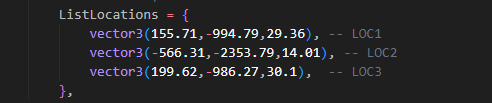
## 3 . Configuring access blip locations
* Add the coordinates where you would like the blips to be located so players can access the arena.
## 4. Configuring Weapons, Ammunition and their image
* At this point it is possible to configure the types of Weapons that can be used in games within the arena, specifically containing 4 different modes of choice;
> ● Pistols.
>
> ● Rifles.
>
> ● Submachine guns.
>
> ● Mixed \[Will alternate between the 3 modes listed above each round].
* If you have registered Weapons/Ammunition that are on your server's black list or even Anti-Cheat, pay attention to this! The reason for this is that when rounds restart, players come back without weapons.
* **UNDER NO CIRCUMSTANCES CHANGE THE TYPE**
## 5. Configure the maps and positions of each team
* You have complete freedom to add as many maps as you want for your players' options, just follow the same creation model for new maps;
```lua
}, {
name = "Observatorio",
src = "http://SEU-IP/YOUR-IP/scriptarena/obsff.png",
spawnPosition = {
teamA = {-285.68,-3787.91,270.21,351.68},
teamB = {-257.84,-3662.13,273.37,168.61}
}
```
## 6. Configuring notification texts
If you want to change the texts of all notifications present in the script, simply edit each function to the new text you want.
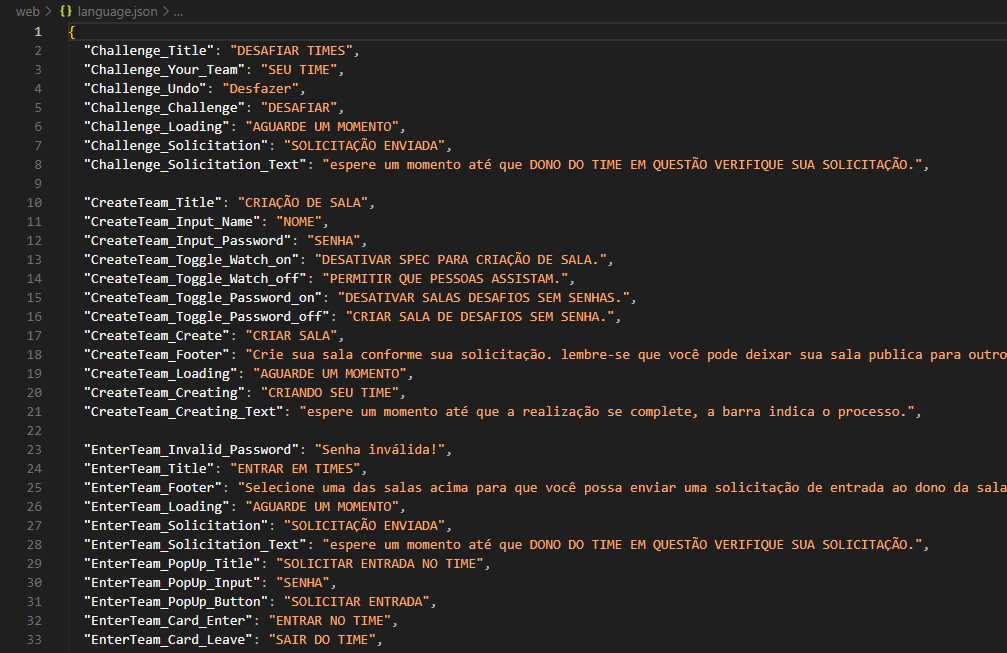
## 7. Configuring All texts present in NUI
* To modify the texts, go to the WEB folder and look for the language.json file. This way you will be able to change all the texts that are present in **DEATGAMES**.